Artificial intelligence is changing more than the way digital products are built—it is changing the way people experience and interact with them.
For years, UX design focused on creating interfaces that were intuitive, predictable, and easy to navigate. Users clicked buttons, followed menus, searched for information, and completed predefined journeys.
But AI is changing this model.
Today, digital products can understand context, predict user needs, personalize experiences, generate content, and respond conversationally. Instead of simply designing screens, product teams are increasingly designing intelligent experiences.
This shift has given rise to a new approach: AI-native UX.
But what exactly does AI-native UX mean, and how is it different from simply adding an AI feature to an existing product?
What Is AI-Native UX?
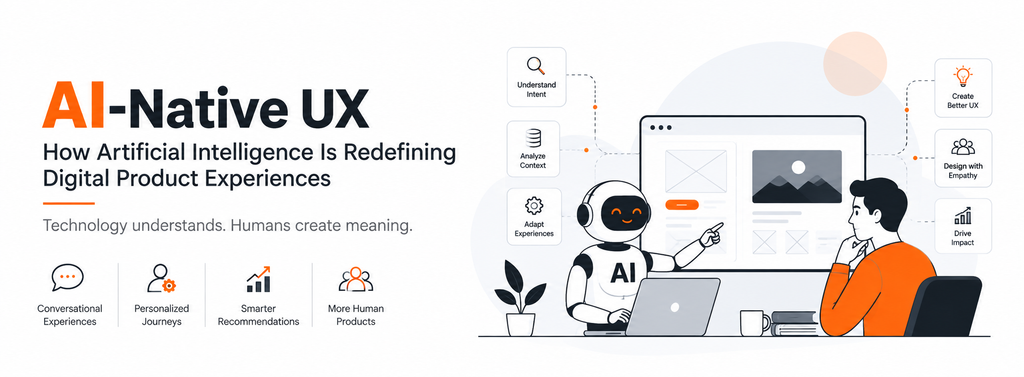
AI-native UX is an approach to product design where artificial intelligence is considered a fundamental part of the user experience rather than an additional feature.
Traditional products generally follow a predictable structure:
User → Interface → Action → Result
AI-native products can create a more dynamic interaction:
User → Intent → AI Understanding → Adaptive Response → User Feedback
The interface may change depending on the user’s needs, behavior, context, or previous interactions.
For example, instead of asking users to search through multiple filters to find a product, an AI-powered shopping experience could allow them to simply describe what they need:
“I need a lightweight laptop for design work under ₹80,000.”
The system can understand the intent, identify relevant products, compare options, and guide the user toward a decision.
This is where AI in UX design becomes much more than automation.
Why AI Is Changing UX Design
The traditional digital experience assumes that users know where to click and what to do next.
AI allows products to become more responsive to what users actually want to accomplish.
This creates several major changes in UX design.
1. From Navigation to Conversation
Traditional interfaces depend heavily on menus, navigation bars, buttons, and search fields.
AI introduces conversational interaction.
Users can communicate with a product using natural language instead of learning how the interface works.
For example:
Traditional UX:
Search → Filters → Categories → Product Page → Compare → Checkout
AI-native UX:
“I need running shoes for daily use, preferably under ₹5,000.”
The system can understand the request and provide relevant options.
This doesn’t mean traditional navigation will disappear. Instead, conversation becomes another layer of interaction.
2. From Static Interfaces to Adaptive Experiences
Most traditional interfaces look the same for every user.
AI-powered UX can adapt based on:
- User behavior
- Preferences
- Previous interactions
- Context
- Location
- Device
- User intent
- Real-time information
Imagine a finance application that recognizes that a user frequently checks spending before payday.
Instead of presenting the same dashboard every time, the product could prioritize:
Upcoming bills → Current balance → Spending summary → Savings suggestions
The experience becomes more relevant without requiring the user to manually customize everything.
This is one of the biggest opportunities for AI-driven product design.
3. From Personalization to Prediction
Personalization traditionally means showing users content based on known preferences.
AI can take this further by predicting what users may need next.
For example:
An e-commerce website might not simply recommend products based on previous purchases. It could identify patterns and anticipate potential needs.
Similarly, a productivity application could recognize recurring tasks and suggest them automatically.
The UX therefore moves from:
“What do you want to do?”
to:
“Here is what you may want to do next.”
However, prediction must be handled carefully.
A product should assist users—not make them feel that the system is making decisions without their permission.
4. AI Makes UX More Personalized
One of the biggest advantages of AI-powered UX is the ability to create highly personalized digital experiences.
Different users can receive different experiences based on their needs.
For example, an online learning platform could adjust the learning experience based on:
- Skill level
- Learning speed
- Previous performance
- Preferred learning format
- Areas where the user struggles
A beginner might receive more explanations and examples, while an advanced learner might see more challenging material.
This creates a more context-aware user experience.
AI-Native UX vs Traditional UX
The difference can be understood through a simple comparison:
| Traditional UX | AI-Native UX |
| Static interfaces | Adaptive interfaces |
| Rule-based experiences | Context-aware experiences |
| User-driven navigation | Intent-driven interaction |
| Fixed workflows | Dynamic workflows |
| Manual personalization | AI-powered personalization |
| Search-based discovery | Conversational discovery |
| Predictable responses | Contextual responses |
| Screen-focused design | Experience-focused design |
The goal isn’t to replace traditional UX principles.
Instead, AI-native design builds on them.
Usability, accessibility, hierarchy, consistency, and visual clarity are still essential.
AI simply adds a new layer of intelligence.
Designing AI Interfaces Requires a Different Mindset
Designing an AI-powered product isn’t the same as designing a normal interface.
With traditional interfaces, designers can generally predict the user’s path.
AI introduces uncertainty.
The system may generate different responses depending on the user’s input.
This means designers need to think about systems and behaviors, not just screens.
UX teams need to consider questions such as:
- What happens when AI gives the wrong answer?
- How does the user correct the AI?
- Can users understand why a recommendation was made?
- What happens when the AI doesn’t understand the request?
- How should uncertainty be communicated?
- When should the product ask for clarification?
- When should a human take over?
These questions are becoming increasingly important in AI product design.
The Importance of Trust in AI UX
AI can be powerful, but users need to trust it before they rely on it.
A beautifully designed AI interface can still fail if users don’t understand what the system is doing.
Good AI UX should communicate:
Transparency
Users should understand when they are interacting with AI.
Explainability
When appropriate, users should be able to understand why the system made a recommendation or generated a result.
Control
Users should be able to modify, reject, or undo AI-generated actions.
Feedback
Users need clear ways to tell the system when something is incorrect.
Human Oversight
For high-impact decisions, AI should not necessarily operate without human involvement.
Trust is not a visual design element. It is an experience design responsibility.
Designing for AI Errors
No AI system is perfect.
AI can misunderstand requests, generate inaccurate information, or make inappropriate recommendations.
Therefore, error states become an important part of AI interface design.
Instead of displaying:
“Something went wrong.”
An AI-native product could explain:
“I couldn’t find enough information to make a reliable recommendation. Would you like to provide your budget or preferred location?”
The second approach keeps the user moving forward.
This is an important principle:
Design the recovery experience, not just the ideal experience.
AI and the Future of Personalization
The future of personalization is likely to move beyond simple recommendations.
AI can potentially create experiences that respond dynamically to individual users.
For example, a travel application could understand:
“I want a three-day trip somewhere quiet, preferably near nature, but I don’t want to spend more than ₹25,000.”
Instead of making the user fill out multiple forms, the system can interpret the intent and create a personalized starting point.
The interface itself becomes part of the conversation.
This is a fundamental shift in digital product experiences.
AI-Native UX Is More Than Adding a Chatbot
One of the biggest misconceptions about AI UX is that adding a chatbot makes a product AI-native.
It doesn’t.
A chatbot can be useful, but AI-native design goes much deeper.
AI can influence:
- Search
- Recommendations
- Onboarding
- Content creation
- Navigation
- Personalization
- Customer support
- Workflow automation
- Decision support
- Accessibility
- Data visualization
- Product discovery
The real question isn’t:
“Where can we add AI?”
Instead, product teams should ask:
“Where can intelligence remove friction or create meaningful value for the user?”
That change in mindset is critical.
How Designers Can Prepare for AI-Native UX
As AI becomes part of digital products, UX designers need to expand their skill sets.
Understand AI Capabilities
Designers don’t necessarily need to become machine-learning engineers, but they should understand what AI can and cannot reliably do.
Design for Conversation
Natural-language interactions require designers to think about prompts, responses, clarification, and conversational flow.
Design for Uncertainty
AI outputs are probabilistic. Designers must account for variations and unexpected responses.
Focus on Human-AI Collaboration
The best AI products don’t necessarily remove humans from the experience.
They help humans make decisions faster and better.
Prioritize Responsible Design
Privacy, transparency, accessibility, bias, security, and user control should be considered from the beginning.
The Future of AI-Powered UX
AI is moving UX design from static interfaces toward intelligent systems.
The next generation of digital products may not simply wait for users to navigate through screens.
They may understand intent, anticipate needs, personalize interactions, and dynamically adapt to different situations.
But this doesn’t mean designers become less important.
In fact, their role becomes more important.
As technology becomes more complex, designers are responsible for making that complexity understandable, useful, and human.
The future of UX isn’t about creating products that feel more robotic.
It’s about creating products that use technology to make digital experiences feel more natural, relevant, and human-centered.
Conclusion
AI-native UX is redefining how digital products are designed, built, and experienced.
From conversational interfaces and adaptive experiences to predictive personalization and intelligent workflows, artificial intelligence is changing the relationship between users and digital products.
For businesses, the opportunity isn’t simply to add AI to an existing product.
It’s to rethink the experience from the ground up.
The brands that succeed will be those that combine AI capabilities with strong UX principles, human-centered thinking, transparency, and trust.
Because the future of digital product design isn’t just about building smarter technology.
It’s about designing smarter experiences.
